Background Information
Periodically, Acquisitions will go through our subscriptions and notify Cataloging about serials and series that are no longer published (ceased) or that we no longer receive (canceled). Cataloging's role is to update the bib and holdings records to reflect that the title has ceased or been canceled.
Note on terminology
Although these instructions apply to both serials and series, the term "serial" will be used throughout for brevity's sake.
Notifications
Acquisitions will email the person assigned to the task with details about the title. Each ceased/canceled title will be in a separate email. The email will include the title of the serial, its MMS ID, and details about whether it has ceased or has been canceled, last received issue, etc. The email may also include information for Acquisitions staff about physical processing of the title (for example, instructions for pulling issues off the shelf for binding). Cataloging staff can ignore those instructions and focus only on the MARC records.
Processing instructions
Instructions for ceased titles
- Verify whether the title has ceased. The notification from Acquisitions will include a comment about the current disposition of the title, but it's always good practice to verify.
- Search OCLC Connexion for the title (the simplest way is to search for the OCLC number that is in the Alma record). If the title has ceased, the OCLC record in Connexion will often reflect this (but not always).
- Check the publication's website for the most recent issue.
- If the title is still being published, treat it as a canceled title (see below for instructions).
- Update the bibliographic record in Alma to show that the title is no longer being published.
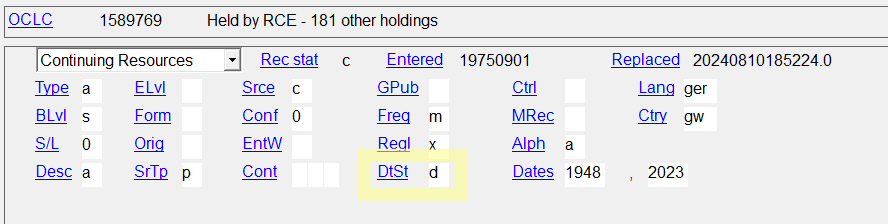
- If the record in OCLC Connexion has been updated to show that the title has ceased (this is indicated with DtSt=d in the fixed fields), check the rest of the record for quality and Export to overlay the bib in Alma.
- If the record in OCLC has not yet been updated, make the following edits in alignment with CONSER guidelines. You can make these edits directly in Alma or in OCLC (and Export the record). For details and complete instructions see pages 10 and 11 of CCM Module 21: Modifying:
- Fixed fields
- Change DtSt to d.
- Fixed fields - Enter year the title ceased in the second Dates field.
- 260/264 - Do not edit 260/264.
- 300 - Give total number of volumes, if known, in 300 $a
- 362 - If the last volume is known, add 362 1_ Ceased with: ______________.
- 785 - If there is a succeeding entry, add it.
- Update the holdings record in Alma to show that the title is no longer being published and that we no longer receive the title.
- LDR (open the editor using Ctrl-F, close the editor with Esc).
- LDR/6 = y - Serial item
- LDR/17 = 4 - Holdings level 4
- LDR/18 = n - No item information
- 008 (open the editor using Ctrl-F, close the editor with Esc).
- 008/6 = 2 - Received and complete or ceased (only option that is different from a canceled title)
- 008/7 = p - Purchase
- 008/8-11 = month and year in YYMM format for last issue received, if known
- 008/16 = Estimate the completeness of our holdings:
- 1 - Complete (95-100% issues held)
- 2 - Incomplete (50-94% issues held)
- 3 - Scattered (less than 50% issues held)
- 008/25 = 0 - Separate copy reports
- Check the other fields, particularly the 866-868, and tidy them if necessary.
- Save and release the holdings record.
Instructions for canceled titles
- Check OCLC for an updated bibliographic record.
- Search OCLC Connexion for the title (the simplest way is to search for the OCLC number that is in the Alma record). If the record is more current than the one in Alma, check the rest of the record for quality and Export to overlay the bib in Alma.
- Update the holdings record in Alma to show that we no longer receive the title. There may be multiple holdings records for the serial (for example, new issues may go in a periodicals room, older issues into STACKS, and oldest issues in LSC). Make the following edits to each of the holdings records:
- LDR (open the editor using Ctrl-F, close the editor with Esc).
- LDR/6 = y - Serial item
- LDR/17 = 4 - Holdings level 4
- LDR/18 = n - No item information
- 008 (open the editor using Ctrl-F, close the editor with Esc).
- 008/6 = 5 - Not currently received
- 008/7 = p - Purchase
- 008/8-11 = month and year in YYMM format for last issue received
- 008/16 = Estimate the completeness of our holdings through when we canceled:
- 1 - Complete (95-100% issues held)
- 2 - Incomplete (50-94% issues held)
- 3 - Scattered (less than 50% issues held)
- 008/25 = 0 - Separate copy reports
- Add public and internal notes to the 852:
- $$z No longer received after volume and/or date
- $$x Date of instruction per initials of person/DEPARTMENT (for example, "5/12/2023 per db/ACQ"
- Check the other fields, particularly the 866-868, and tidy them if necessary.
- Save and release the holdings record.