How to use the Advanced Search feature in Outlook 365
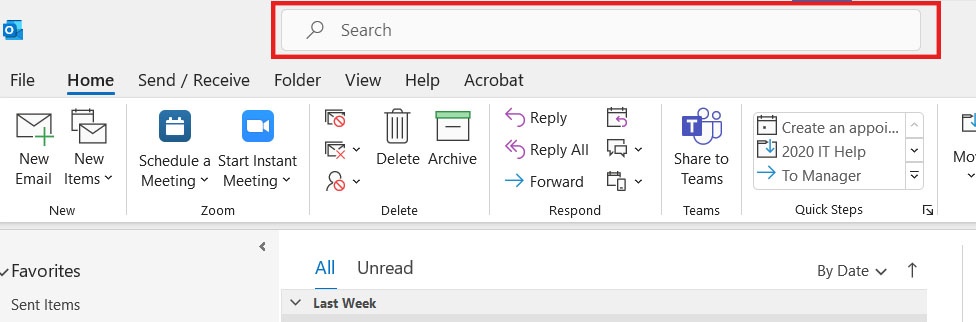
- Click on the Search toolbar at the top of the Outlook window.
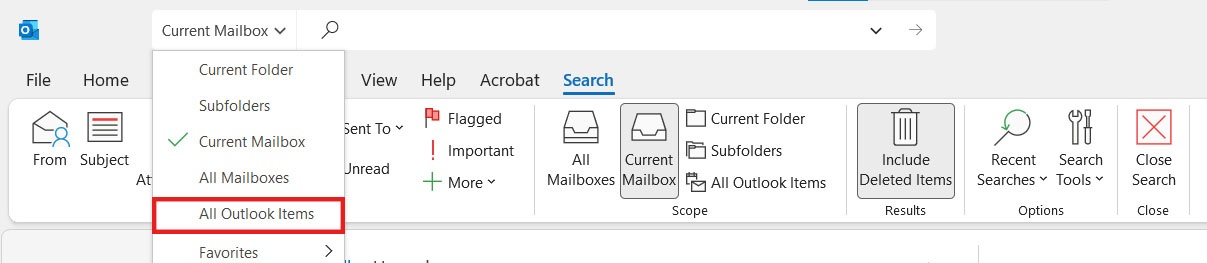
- Click on the dropdown on the left of the Search box and select All Outlook Items. This will results from your mail, calendar and tasks.
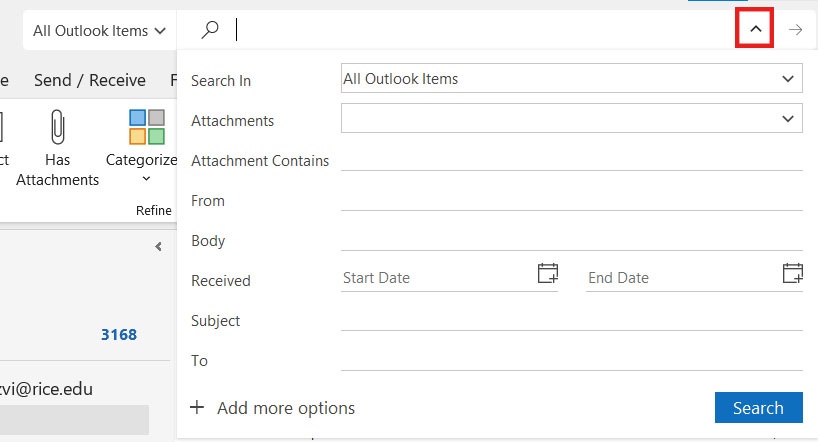
- Click the arrow located in the right of the search bar to toggle between seeing additional search fields. Fill out the fields to narrow down your search. Click the Search button when you are done.
Search Tips:
- For an exact match of a string of words, place your text in quotes, e.g., “Sam”.
- Try thinking of a unique word or phrase in the email you are looking for to narrow your search results.
- Punctuation is ignored in the search text.
- When searching for numbers, the string of numbers must be at least five digits long.
- Once you have your search results use the filters in the top right-hand corner e.g., Date, From, Size etc. to locate the email you are looking for.
The following link contains additional information on how to improve your search parameters, https://support.microsoft.com/en-us/office/how-to-search-in-outlook-d824d1e9-a255-4c8a-8553-276fb895a8da/
The following link is a useful video tutorial that covers how to quickly find an email in Outlook. https://www.youtube.com/watch?v=z_-Zn5e7asQ.