Wiki's at Rice
Wiki.rice.edu offers free, on-demand, private wiki spaces for group collaboration. It takes about 2 - 3 hours for an automated process to set up your space, and you can grant access to others at Rice either individually or by their LDAP group. You can also open up the wiki to the world for viewing only.
STEP 1: Request space for your wiki
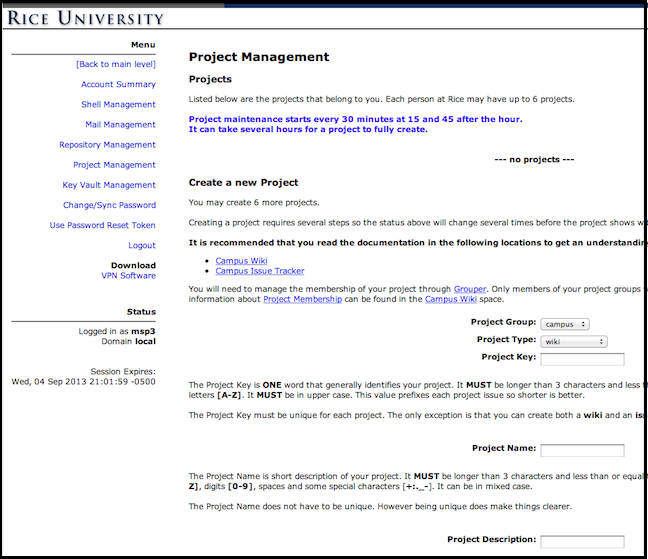
- Go to http://old.apply.rice.edu with your Netid and password and then go to Account Maintenance on the left column.
- Choose Project Management from the left column.
- From the pull down menu choose wiki and fill-in the desired name of your wiki. Notice that you can currently own up to six wikis. Your wiki space will be created shortly and automatically.
STEP 2: Access and configure your wiki.
As soon as you see in http://old.apply.rice.edu that your wiki space is ready you can get started building it and configuring it.
- Go to http://wiki.rice.edu. First you will see the initial page as in the screen shot below. (You can later change all that).
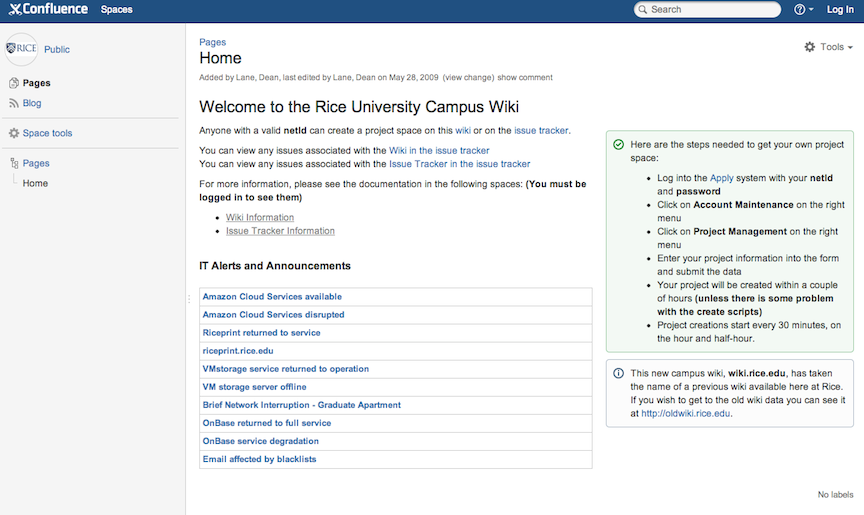
- Go to the Dashboard from the left top corner (see the screen shot above). You should see your wiki (with the name you had chosen in Step 1).
- Click on your wiki and you will find yourself in the very top page of your wiki. If you click on Tools and pull down this menu, you will see you get a few options. But you cannot yet start adding pages. First, you need to click on Log In and use your Netid and password to authenticate yourself into your wiki.
- You will notice that after you login you have more options available to you, including the option of adding child pages, editing a page and so on.
At this point, start editing your top page, go to the "Wiki Markup" mode of editing your page and check out the Help Tips and the Full notation guide. They will be your best friends as you learn the markup language in which the wiki pages are written. You may find the Rich text edit mode easier at first and start going to the Markup edit mode more as your formatting becomes more advanced.
Legend has it that the word "wiki" comes from the Hawaiian word "wiki wiki" which means something like "paddle fast" or "come on, quickly, quickly"... |
- Call the Help Desk at xHELP (713-348-4357) if you would like some instruction on wiki building. We will normally offer courses per request to groups at least once a semester.
STEP 3: Control access to your wiki
- From the Browse pull down menu on the top band, choose Space Admin.
- Choose Permissions to control who has what permission in your space.
STEP 3A: Control individual user's permissions
Notice that you can either add individual users from the middle section of the page using their Netid. If you would like non-Rice people to participate in editing your wiki, you will need to sponsor them for Visitor Accounts from: visitor.rice.edu
If your wiki involves collaboration of a great number of people with different roles you probably want to use the method in the top of the page, where you assign permissions to groups.
Then you can add individuals to a Group, depending on the role they will have. |
STEP 3B: Control Wiki Groups and Permissions
Wiki Groups for each Wiki
Whenever a new WIKI Project is created, it automatically creates 3 groups for the Project, with
the owner initially added to each group:
- Project Administrators - are the people that have the most control over the wiki or issue tracker project
- Project Developers - have slightly less privileges than administrators but more than regular users.
- Project Users - have the least privileges and basically just have the ability to see or minimally use the project
- To use access control by groups you will need to be familiar with the middleware (software, utility) called Grouper. Please refer to the directions on the Rice Campus Wiki, at
or specifically these wiki pages: