Log in
Skip to sidebar
Skip to main content
Spaces
Hit enter to search
Help
Online Help
Keyboard Shortcuts
Feed Builder
What’s new
Available Gadgets
About Confluence
Log in
IT Jones Graduate School
Pages
Blog
Space shortcuts
File lists
Child pages
Zoom
How to check and update Zoom client
Browse pages
Configure
Space tools
A
t
tachments (2)
Page History
Page Information
Resolved comments
View in Hierarchy
View Source
Export to PDF
Export to Word
Pages
…
Home
Tips and Tricks
Zoom
Jira links
How to check and update Zoom client
Created by
Judy Hua
, last modified on
Jul 02, 2025
Open the
Zoom desktop client
.
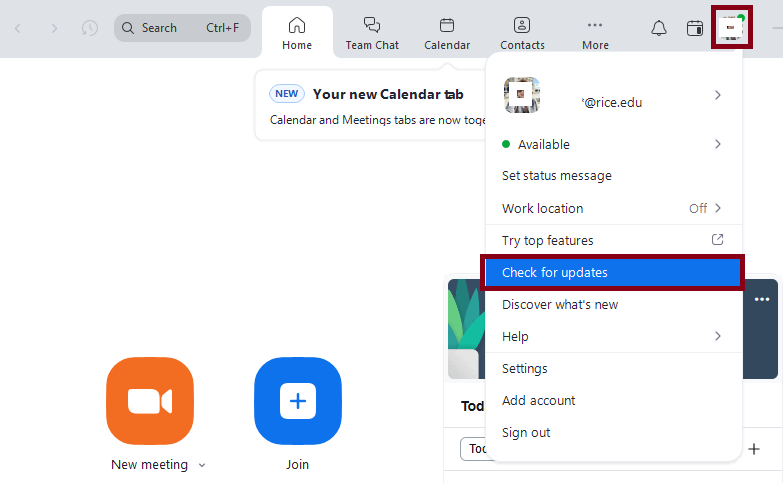
Click on your
profile picture
, and select
Check for updates.
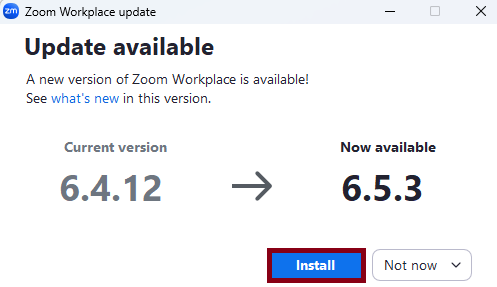
Click
Install
.
zoom
client
update
Overview
Content Tools
{"serverDuration": 57, "requestCorrelationId": "eaa991e0417bab98"}