Log in
Skip to sidebar
Skip to main content
Spaces
Hit enter to search
Help
Online Help
Keyboard Shortcuts
Feed Builder
What’s new
Available Gadgets
About Confluence
Log in
IT Jones Graduate School
Pages
Blog
Space shortcuts
File lists
Child pages
Ricemail
How to setup auto reply for Ricemail
Browse pages
Configure
Space tools
A
t
tachments (3)
Page History
Page Information
Resolved comments
View in Hierarchy
View Source
Export to PDF
Export to Word
Pages
…
Home
JGS FAQs
E-mail Related
Ricemail
Jira links
How to setup auto reply for Ricemail
Created by
Judy Hua
, last modified on
Dec 19, 2025
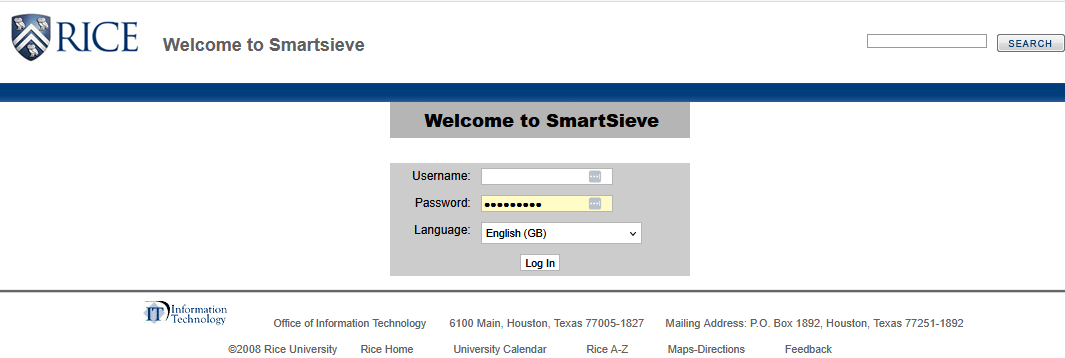
Log in to SmartSieve at
https://www.ricemail.rice.edu/smartsieve/login.php
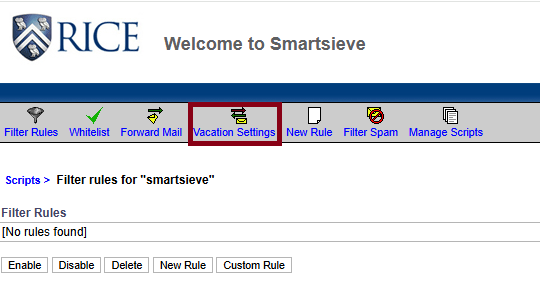
Click on
Vacation Settings.
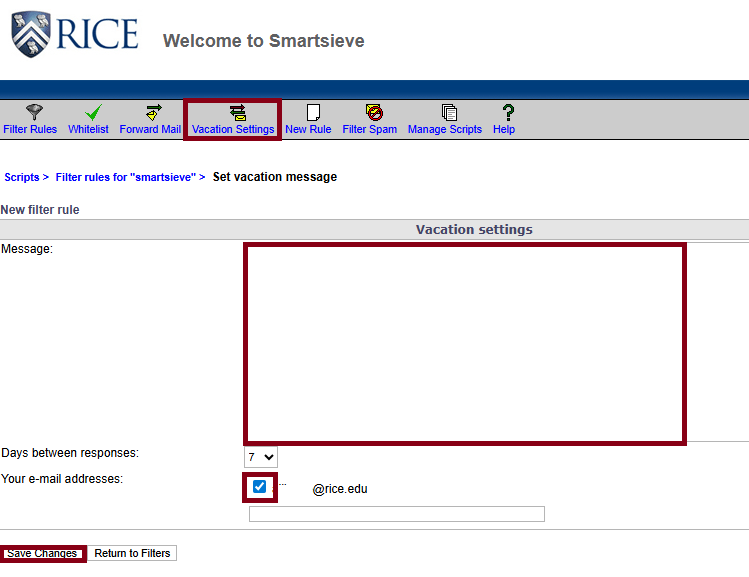
Type your message in the Message box. Check the box next to the email address, then click
Save Changes
.
No labels
Overview
Content Tools
{"serverDuration": 82, "requestCorrelationId": "794d122abed5142d"}